Telegram OCR: Send Photos, Get Structured Data
Discover how Telegram OCR with Mia AI Assistant turns photos of receipts, documents, business cards, and more into structured text — instantly, inside your Telegram chat, without installing extra apps.
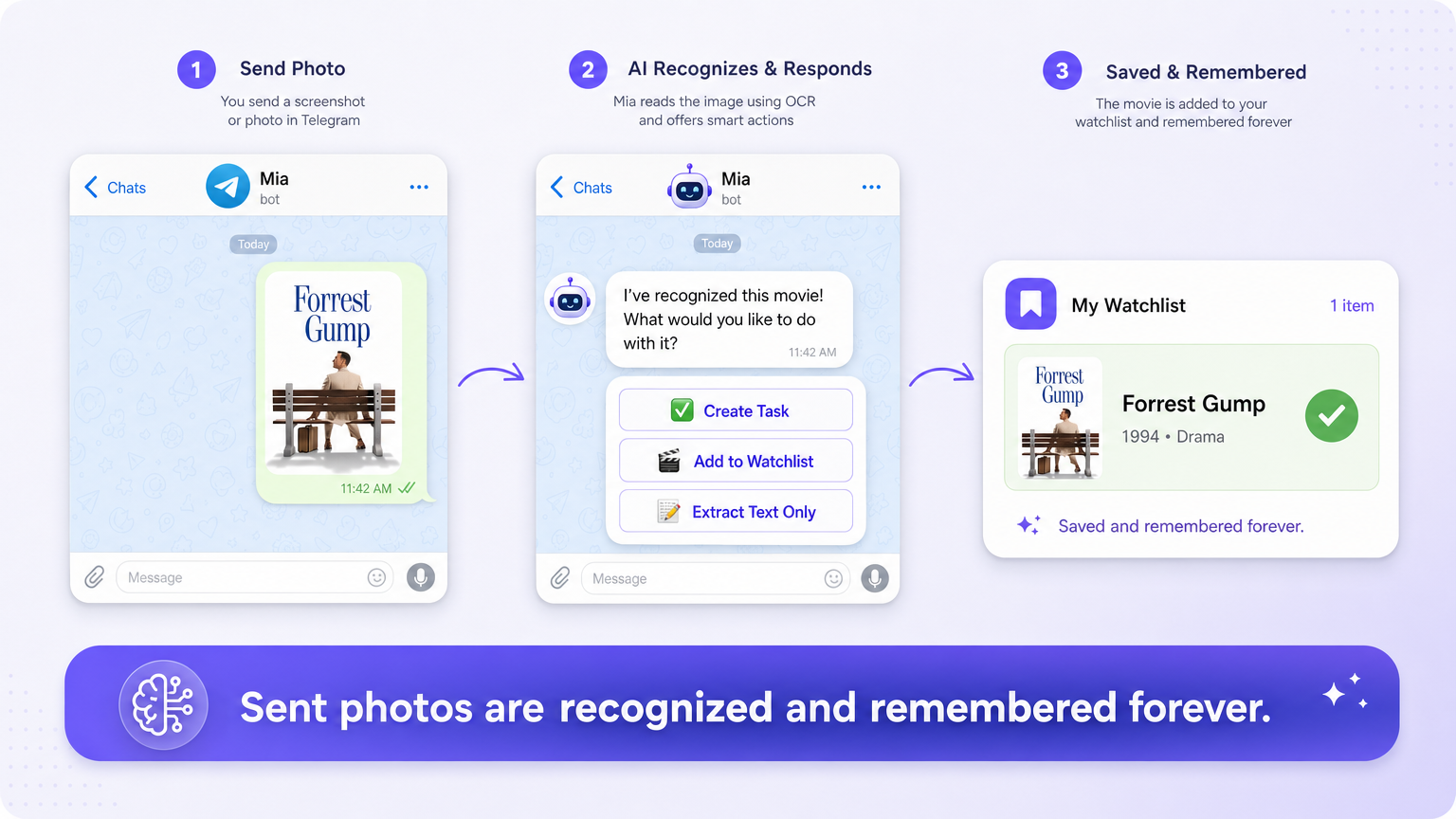
Telegram OCR: Send Photos, Get Structured Data
Stop installing another app. Your Telegram chat with Mia AI already has powerful OCR built in.
Every day, we take photos of receipts, documents, business cards, whiteboards, and handwritten notes — and then forget to do anything useful with them. A receipt scanner app sits unused on your phone. Scanned PDFs languish in cloud folders.
What if you could just snap a picture, send it to Telegram, and get clean, structured text back in seconds? That is exactly what Telegram OCR with Mia AI Assistant does — no extra downloads, no login walls, no learning curve.
What Is OCR — and Why It Matters More Than Ever
Optical Character Recognition (OCR) is the technology that converts images of text into machine-readable, editable, and searchable content. Modern AI-powered OCR goes far beyond what older tools could do: it understands handwriting, corrects perspective distortion, handles multiple languages in a single image, and — most importantly — extracts structured data, not just raw text.
Think about it: a receipt isn't just a block of text. It has a merchant name, date, line items, taxes, and a total. A business card has a name, title, phone, email, and company. A form has fields with labels and values. Telegram OCR with AI doesn't just read pixels — it understands context and returns data you can actually use.
How Mia Processes Photos in Telegram
Working with AI OCR Telegram through Mia is as simple as a normal chat message:
- Take or upload a photo — your camera roll, a screenshot, or a new snapshot from the camera.
- Send it to your Telegram chat with Mia — just like you'd send a voice message or a sticker.
- Mia runs OCR + AI extraction — the image is analyzed, text is recognized, and structured fields are identified automatically.
- You get structured data back in seconds — formatted text, tables, JSON, or a summary — right in your chat, ready to copy, save, or forward.
You can find more about how this integration works at miahandles.com/how-it-works.
The entire pipeline happens inside your existing Telegram workflow. No browser tab, no file upload dialogs, no cloud storage accounts to juggle.
Real-World Use Cases
Receiving Scanning and Expense Tracking
Send a photo of any receipt to Mia and get back the merchant, date, individual items, subtotal, tax, and grand total — cleanly separated. If you need a receipt scanner app for expense reports, invoicing, or personal finance tracking, this photo to text Telegram workflow eliminates the need for a separate application entirely.
Document Digitization
Contracts, invoices, identification documents, certificates, and official forms can all be processed through your document scanner Telegram chat. Mia extracts text, preserves formatting where possible, and can structure key fields — making it easy to search your chat history later or forward extracted data to a colleague.
Business Cards
Collecting business cards at events used to mean a stack of paper sitting in a drawer. Now send a quick photo to Telegram, and Mia returns a clean contact card: name, title, company, phone, email — ready to import into your CRM or address book.
Recipes and Handwritten Notes
Found a printed recipe you want to save? A handwritten shopping list from a partner? A whiteboard photo from a meeting? Mia's OCR handles printed and handwritten text in multiple languages, converting physical media into digital text you can search, bookmark, or share.
Advantages of Telegram OCR Over Traditional Scanning
| Feature | Traditional Scanner App | Telegram OCR with Mia |
|---|---|---|
| Separate app needed | Yes | No — works in Telegram |
| Learning curve | Menu navigation, settings | Send a photo, get results |
| Multi-language OCR | Often limited | Native AI-powered recognition |
| Structured data extraction | Basic text only | AI understands context and fields |
| Accessibility | Open the app first | Your chat is already open |
| Integration | Siloed files | Forward, copy, or process data instantly |
The speed difference is significant. A typical scan-then-download-then-open workflow takes 60 to 120 seconds. Sending a photo to Telegram and receiving structured OCR results takes under 10 seconds.
You can explore the full range of Mia's capabilities at miahandles.com/features, where OCR sits alongside task management, calendar support, file processing, and more — all accessible from one Telegram chat.
How It Works Under the Hood
When you send an image to Mia in Telegram, the system performs several steps silently in the background:
- Image preprocessing — auto-crop, deskew, and contrast enhancement ensure the highest recognition quality.
- AI OCR engine — modern neural-network-based recognition handles printed text, handwritten notes, and mixed-language content.
- Semantic extraction — the AI doesn't just return raw characters; it identifies entities, tables, key-value pairs, and document structure.
- Natural-language response — results are delivered in a format you asked for, or in the most useful default when you didn't specify.
For deeper details on the technical architecture, visit miahandles.com/how-it-works.
Getting Started
Using Telegram OCR with Mia requires zero setup:
- Open your Telegram chat with Mia.
- Take a photo or select one from your gallery.
- Send it along with any instruction — "Extract the items and total," "Give me the contact details," or simply "Read this."
- Receive structured text in seconds.
Learn more about connecting with Mia at miahandles.com/telegram.
Try Telegram OCR Today
If you're still using a separate receipt scanner app or hunting for a document scanner Telegram bot, you're doing more work than necessary. Telegram OCR through Mia AI Assistant combines accurate photo-to-text conversion, intelligent data extraction, and your favorite messaging app into one seamless flow.
Send a photo now — and see what structured data comes back.